Note
This page was generated from a Jupyter notebook.
Download: explore_cxi_file.ipynb
CXI File Browser#
This notebook provides a simple example to show you how to use the CXI file browser.
[1]:
import cdiutils

cdiutils.plot.update_plot_params()
Set up the file path#
First, provide the path to the CXI file you want to explore.
[ ]:
# Load the data
# Replace with the actual path to your data file
path = "path/to/your/data.cxi"
Basic usage#
Create an explorer instance and print a summary of the file contents.
The CXIExplorer provides four main methods for exploring CXI files:
summarise()- Provides an overview of the file including file size, number of groups and datasetstree(max_depth=None, show_attributes=False)- Displays the hierarchical structure of the file in a tree formatsearch(pattern)- Finds datasets, groups, or attributes matching a specific patternshow(path)- Visualises a specific dataset, with automatic plotting for array data
Additionally, the explore() method launches an interactive widget-based browser.
[3]:
explorer = cdiutils.io.CXIExplorer(path)

explorer.summarise()
CXI File Summary: S706_postprocessed_data.cxi
File size: 142.77 MB
Groups: 45
Datasets: 198
Total data size: 142.65 MB

Entries: 1

entry_1:
  Default: data_1
  amplitude: 1
  data: 12
  detector: 1
  displacement: 2
  dspacing: 1
  geometry: 1
  het: 3
  image: 12
  lattice: 1
  numpy: 1
  parameters: 1
  phase: 1
  process: 1
  result: 5
  sample: 1
  source: 1
  support: 1
  surface: 1
View hierarchical structure#
Display the file’s hierarchical structure as a tree, limiting depth for clarity.
[4]:
explorer.tree(max_depth=2)
CXI File: S706_postprocessed_data.cxi
└── /
    ├── creator (scalar) object
    ├── cxi_version (scalar) int64
    ├── entry_1
    │   ├── amplitude -> /entry_1/image_1
    │   ├── data_1
    │   │   └── 1 more entrie(s)...
    │   ├── data_10
    │   │   └── 1 more entrie(s)...
    │   ├── data_11
    │   │   └── 1 more entrie(s)...
    │   ├── data_12
    │   │   └── 1 more entrie(s)...
    │   ├── data_2
    │   │   └── 1 more entrie(s)...
    │   ├── data_3
    │   │   └── 1 more entrie(s)...
    │   ├── data_4
    │   │   └── 1 more entrie(s)...
    │   ├── data_5
    │   │   └── 1 more entrie(s)...
    │   ├── data_6
    │   │   └── 1 more entrie(s)...
    │   ├── data_7
    │   │   └── 1 more entrie(s)...
    │   ├── data_8
    │   │   └── 1 more entrie(s)...
    │   ├── data_9
    │   │   └── 1 more entrie(s)...
    │   ├── detector_1
    │   │   └── 7 more entrie(s)...
    │   ├── displacement -> /entry_1/image_5
    │   ├── displacement_gradient -> /entry_1/image_6
    │   ├── dspacing -> /entry_1/image_11
    │   ├── geometry_1
    │   │   └── 8 more entrie(s)...
    │   ├── het_strain -> /entry_1/image_7
    │   ├── het_strain_from_dspacing -> /entry_1/image_9
    │   ├── het_strain_with_ramp -> /entry_1/image_8
    │   ├── image_1
    │   │   └── 5 more entrie(s)...
    │   ├── image_10
    │   │   └── 5 more entrie(s)...
    │   ├── image_11
    │   │   └── 5 more entrie(s)...
    │   ├── image_12
    │   │   └── 5 more entrie(s)...
    │   ├── image_2
    │   │   └── 5 more entrie(s)...
    │   ├── image_3
    │   │   └── 5 more entrie(s)...
    │   ├── image_4
    │   │   └── 5 more entrie(s)...
    │   ├── image_5
    │   │   └── 5 more entrie(s)...
    │   ├── image_6
    │   │   └── 5 more entrie(s)...
    │   ├── image_7
    │   │   └── 5 more entrie(s)...
    │   ├── image_8
    │   │   └── 5 more entrie(s)...
    │   ├── image_9
    │   │   └── 5 more entrie(s)...
    │   ├── lattice_parameter -> /entry_1/image_12
    │   ├── numpy_het_strain -> /entry_1/image_10
    │   ├── parameters_1
    │   │   └── 35 more entrie(s)...
    │   ├── phase -> /entry_1/image_4
    │   ├── process_1
    │   │   └── 5 more entrie(s)...
    │   ├── result_1
    │   │   └── 5 more entrie(s)...
    │   ├── result_2
    │   │   └── 4 more entrie(s)...
    │   ├── result_3
    │   │   └── 3 more entrie(s)...
    │   ├── result_4
    │   │   └── 5 more entrie(s)...
    │   ├── result_5
    │   │   └── 5 more entrie(s)...
    │   ├── sample_1
    │   │   └── 3 more entrie(s)...
    │   ├── source_1
    │   │   └── 2 more entrie(s)...
    │   ├── support -> /entry_1/image_2
    │   └── surface -> /entry_1/image_3
    ├── file_path (scalar) object
    ├── time (scalar) |S19
    └── version (scalar) object
Search functionality#
Search for specific path using keywords.
Ex: you know that the dataset you are looking for contains the word “strain” in its name.
[7]:
explorer.search("strain")
Found 16 matches for 'strain':
- Soft Link: entry_1/het_strain (soft link name match (→ /entry_1/image_7))
- Soft Link: entry_1/het_strain_from_dspacing (soft link name match (→ /entry_1/image_9))
- Soft Link: entry_1/het_strain_with_ramp (soft link name match (→ /entry_1/image_8))
- Soft Link: entry_1/numpy_het_strain (soft link name match (→ /entry_1/image_10))
- Group: entry_1/result_5/strain_averages (name match)
- Dataset: entry_1/result_5/strain_averages/bulk (name match)
- Dataset: entry_1/result_5/strain_averages/bulk_density (name match)
- Dataset: entry_1/result_5/strain_averages/overall (name match)
- Dataset: entry_1/result_5/strain_averages/surface (name match)
- Dataset: entry_1/result_5/strain_averages/surface_density (name match)
- Group: entry_1/result_5/strain_fwhms (name match)
- Dataset: entry_1/result_5/strain_fwhms/bulk (name match)
- Dataset: entry_1/result_5/strain_fwhms/bulk_density (name match)
- Dataset: entry_1/result_5/strain_fwhms/overall (name match)
- Dataset: entry_1/result_5/strain_fwhms/surface (name match)
- Dataset: entry_1/result_5/strain_fwhms/surface_density (name match)
Display specific datasets#
View the contents of a specific dataset by its path.
[8]:
explorer.show("entry_1/dspacing")
Path: entry_1/dspacing
Type: Soft Link → /entry_1/image_11
Target Content:

        Path: /entry_1/image_11
        Title: dspacing
        Type: Group with 5 items.
        Content:

                Path: /entry_1/image_11/data
                Type: Dataset
                Shape: (110, 110, 110)
                Dtype: float64
                Data summary: min=2.049, max=2.051, mean=2.050
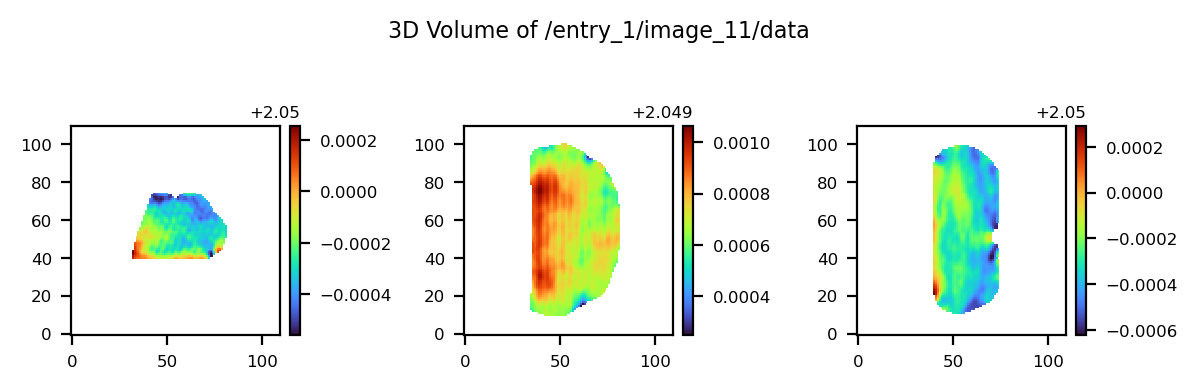
                Path: /entry_1/image_11/data_space
                Type: Dataset
                Value: Direct space

                Path: /entry_1/image_11/image_size
                Type: Dataset
                Shape: (3,)
                Dtype: int64
                Values: [110 110 110]

                Path: /entry_1/image_11/process_1
                Type: Soft Link → /entry_1/process_1

                Path: /entry_1/image_11/title
                Type: Dataset
                Value: dspacing
Interactive exploration#
Launch an interactive browser to navigate through the file.
[9]:
explorer.explore()
Closing the explorer#
Always close the explorer when finished to release file resources. When you delete the explorer (del explorer), the file will also be closed automatically.
[10]:
explorer.close()
Using context manager#
A cleaner approach is to use the context manager, which automatically closes the file when done. Note that using the context manager prevents using the interactive explore() method after exiting the context.
[11]:
with cdiutils.io.CXIExplorer(path) as explorer:
    # Print a summary of the file
    print("File summary:")
    explorer.summarise()

    # Print the hierarchical tree structure
    print("\nTree:")
    explorer.tree(max_depth=1)

    # Search for specific datasets
    print("\nSearch specific key word:")
    explorer.search("strain")

    # Show a specific dataset
    print("\nShow specific dataset:")
    explorer.show("entry_1/dspacing")
File summary:
CXI File Summary: S706_postprocessed_data.cxi
File size: 142.77 MB
Groups: 45
Datasets: 198
Total data size: 142.65 MB

Entries: 1

entry_1:
  Default: data_1
  amplitude: 1
  data: 12
  detector: 1
  displacement: 2
  dspacing: 1
  geometry: 1
  het: 3
  image: 12
  lattice: 1
  numpy: 1
  parameters: 1
  phase: 1
  process: 1
  result: 5
  sample: 1
  source: 1
  support: 1
  surface: 1

Tree:
CXI File: S706_postprocessed_data.cxi
└── /
    ├── creator (scalar) object
    ├── cxi_version (scalar) int64
    ├── entry_1
    │   └── 47 more entrie(s)...
    ├── file_path (scalar) object
    ├── time (scalar) |S19
    └── version (scalar) object

Search specific key word:
Found 16 matches for 'strain':
- Soft Link: entry_1/het_strain (soft link name match (→ /entry_1/image_7))
- Soft Link: entry_1/het_strain_from_dspacing (soft link name match (→ /entry_1/image_9))
- Soft Link: entry_1/het_strain_with_ramp (soft link name match (→ /entry_1/image_8))
- Soft Link: entry_1/numpy_het_strain (soft link name match (→ /entry_1/image_10))
- Group: entry_1/result_5/strain_averages (name match)
- Dataset: entry_1/result_5/strain_averages/bulk (name match)
- Dataset: entry_1/result_5/strain_averages/bulk_density (name match)
- Dataset: entry_1/result_5/strain_averages/overall (name match)
- Dataset: entry_1/result_5/strain_averages/surface (name match)
- Dataset: entry_1/result_5/strain_averages/surface_density (name match)
- Group: entry_1/result_5/strain_fwhms (name match)
- Dataset: entry_1/result_5/strain_fwhms/bulk (name match)
- Dataset: entry_1/result_5/strain_fwhms/bulk_density (name match)
- Dataset: entry_1/result_5/strain_fwhms/overall (name match)
- Dataset: entry_1/result_5/strain_fwhms/surface (name match)
- Dataset: entry_1/result_5/strain_fwhms/surface_density (name match)

Show specific dataset:
Path: entry_1/dspacing
Type: Soft Link → /entry_1/image_11
Target Content:

        Path: /entry_1/image_11
        Title: dspacing
        Type: Group with 5 items.
        Content:

                Path: /entry_1/image_11/data
                Type: Dataset
                Shape: (110, 110, 110)
                Dtype: float64
                Data summary: min=2.049, max=2.051, mean=2.050
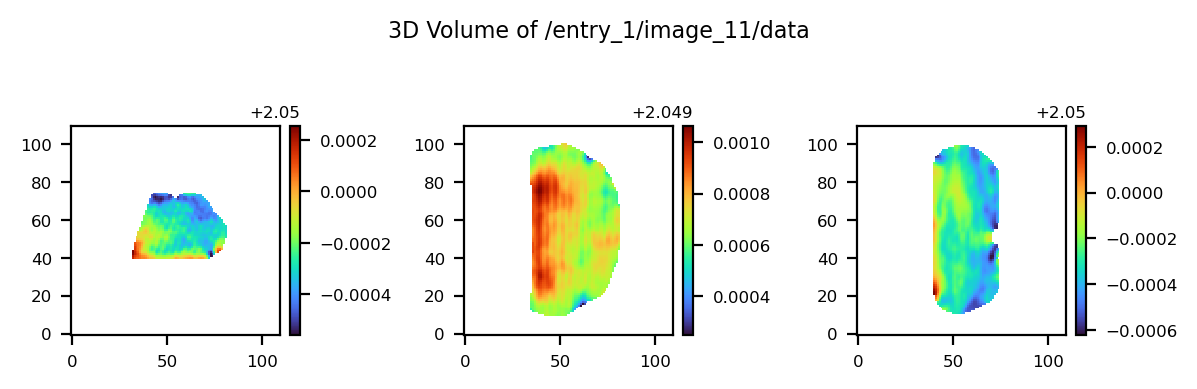
                Path: /entry_1/image_11/data_space
                Type: Dataset
                Value: Direct space

                Path: /entry_1/image_11/image_size
                Type: Dataset
                Shape: (3,)
                Dtype: int64
                Values: [110 110 110]

                Path: /entry_1/image_11/process_1
                Type: Soft Link → /entry_1/process_1

                Path: /entry_1/image_11/title
                Type: Dataset
                Value: dspacing
Direct use of CXIFile class#
The CXIExplorer can also be accessed directly from the CXIFile class using get_explorer(), which returns a ready-to-use CXIExplorer instance.
[12]:
cxi_file = cdiutils.CXIFile(path)

# Quick interactive exploration
print("Summary:")
cxi_file.get_explorer().summarise()

# or:
explorer = cxi_file.get_explorer()
print("\nTree:")
explorer.tree(max_depth=1)

# When finished
cxi_file.close()
Summary:
CXI File Summary: S706_postprocessed_data.cxi
File size: 142.77 MB
Groups: 45
Datasets: 198
Total data size: 142.65 MB

Entries: 1

entry_1:
  Default: data_1
  amplitude: 1
  data: 12
  detector: 1
  displacement: 2
  dspacing: 1
  geometry: 1
  het: 3
  image: 12
  lattice: 1
  numpy: 1
  parameters: 1
  phase: 1
  process: 1
  result: 5
  sample: 1
  source: 1
  support: 1
  surface: 1

Tree:
CXI File: S706_postprocessed_data.cxi
└── /
    ├── creator (scalar) object
    ├── cxi_version (scalar) int64
    ├── entry_1
    │   └── 47 more entrie(s)...
    ├── file_path (scalar) object
    ├── time (scalar) |S19
    └── version (scalar) object
Load data from a CXI file#
There are several ways to open a CXI file. The most common way is to use the CXIFile class, which provides a simple interface for reading and writing CXI files.
You can load data from a CXI file using the classic approach: <!– ```python cxi_file = CXIFile(file_path) cxi_file.open() data = cxi_file[“entry_1/amplitude”] cxi.close() # Don’t forget to close the file!
- Or you can use the context manager, i.e. the `with` statement to automatically close the file when done:
```python
with CXIFile(file_path) as cxi_file:
    data = cxi_file["entry_1/amplitude"]
cdiutilsprovides a convenient function to load data from CXI files. You can specify the path to the CXI file and a dataset name to load. If the dataset name is not the exact full “key path”, say"voxel_size"instead of"entry_1/result_1/voxel_size", the function will find it for you anyway. Note that you can provide as much as keys as you want, and the function will return a dictionary with the keys as the dataset names and the values as the data loaded from the CXI file. –>
[ ]:
cxi_file = cdiutils.CXIFile(path)
cxi_file.open()
data = cxi_file["entry_1/amplitude"]
cxi_file.close()  # Don't forget to close the file!
Or you can use the context manager, i.e. the
withstatement to automatically close the file when done:
[ ]:
with cdiutils.CXIFile(path) as cxi_file:
    data = cxi_file["entry_1/amplitude"]
Finally, you can use the
cdiutils.io.load_cxifunction to conveniently load data from CXI files. Thecdiutilslibrary provides a convenient function to load data from CXI files. It requires the path to the CXI file and a dataset name to load. If the dataset name is not the exact full “key path”, say"voxel_size"instead of"entry_1/result_1/voxel_size", the function will find it for you anyway. Note that you can provide as much as keys as you want, and the function will return a dictionary with the keys as the dataset names and the values as the data loaded from the CXI file.
[ ]:
voxel_size = cdiutils.io.load_cxi(path, "voxel_size")  # simple value

data = cdiutils.io.load_cxi(path, "amplitude", "het_strain")  # dictionary

print(data.keys())
Credits#
This notebook was created by Clément Atlan, ESRF, 2025. It is part of the cdiutils package, which provides tools for BCDI data analysis and visualisation. If you have used this notebook or the cdiutils package in your research, please consider citing the package clatlan/cdiutils You’ll find the citation information in the cdiutils package documentation.
@software{Atlan_Cdiutils_A_python,
author = {Atlan, Clement},
doi = {10.5281/zenodo.7656853},
license = {MIT},
title = {{Cdiutils: A python package for Bragg Coherent Diffraction Imaging processing, analysis and visualisation workflows}},
url = {https://github.com/clatlan/cdiutils},
version = {0.2.0}
}